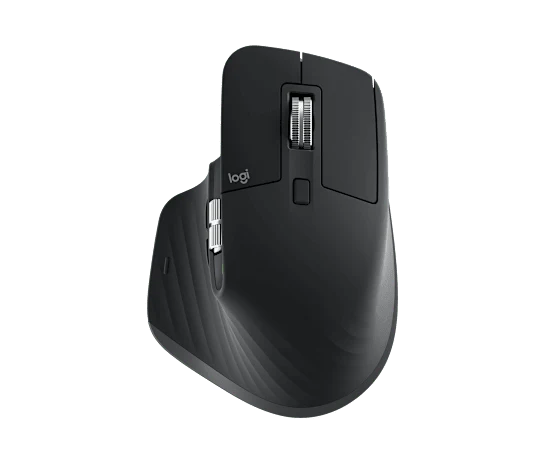
The MX Master 3S Bluetooth Edition is our pick here for a right-handed desk setup built around documents, spreadsheets, and creative software. Its adjustable sensor, MagSpeed wheel, and software customization prioritize everyday control. Choose it for those workflow features rather than treating it as a lightweight gaming mouse.
What makes it worth a look
- The MagSpeed scroll wheel is a useful reason to upgrade for long documents and timelines.
- Logi Options+ supports app-specific customization for a more personal workflow.
- Quiet Clicks are a thoughtful feature for a shared workspace.
Buy for the wheel and the workflow
A work mouse earns its place through the actions you repeat. Long documents, large spreadsheets, and creative timelines are a natural match for this design. The scroll wheel and configurable controls matter more here than chasing the highest sensor number.
Make customization earn its keep
Start with one or two app-specific actions that you use constantly. Adding every available shortcut at once can make a new mouse harder to learn. A small, memorable set of controls is a better starting point than a complicated setup you will rarely use.
The edition matters
The current official page identifies this model as the Bluetooth Edition. Older listings and regional bundles can include different accessories. Check the exact product name, connection method, supported operating system, and box contents on the store page before buying.
Who should choose something else?
Left-handed users need a different shape. Anyone prioritizing very low weight, a compact travel footprint, or competitive gaming should start with a mouse designed for that job. For a primary desk, though, the MX Master approach gives useful controls a clear purpose.
Useful tradeoffs
- The sculpted shape is designed for right-handed use.
- Advanced customization depends on compatible software and operating-system support.
- Edition and bundle contents vary. Check whether a receiver is included rather than assuming it is.
The details that matter
- Edition
- Bluetooth Edition
- Sensor
- Up to 8,000 DPI
- Scrolling
- MagSpeed electromagnetic wheel
- Clicks
- Quiet Clicks
- Customization
- Logi Options+
- Shape
- Sculpted, right-handed
Specifications reflect the manufacturer’s published information. Performance figures are manufacturer ratings, not TechGrounded measurements.
Before you choose
Read our desk & work buying guide → for the questions that matter beyond the spec sheet.
Your questions, answered.
Who is the MX Master 3S for?
It suits right-handed users who want a sculpted desk mouse with configurable controls for productivity software.
Does the MX Master 3S Bluetooth Edition include a USB receiver?
Check the exact regional listing and box contents. Bluetooth Edition and older receiver bundles should not be assumed to include the same accessories.
What is the sensor resolution?
Logitech specifies an adjustable optical sensor of up to 8,000 DPI. The best setting depends on your display and preferences.
Source checked October 19, 2026. Photography: Logitech. Our editorial standards.
We may earn a commission from qualifying purchases through affiliate links. Commercial relationships do not determine our conclusions.